When to use BGP address-family?
I commonly see BGP configured on a provider (P/PE) router like this (this is a real router snippet just anonymised);
router bgp 12345
neighbour 1.1.1.1 remote-as 12345 ! iBGP peer
address-family ipv4
neighbour 1.1.1.1 remote-as 12345 ! iBGP peer
address-family vpnv4
neighbour 1.1.1.1 remote-as 12345 ! iBGP peer
address-family ipv4 vrf Customer1
neighbour 10.0.0.1 remote-as 67890 ! eBGP peer
I understand the CE peering defined under "address-family ipv4 vrf Customer1" because we are placing their routes into that VRF
I understand that "address-family vpnv4" is used to define provider iBGP peers to which other CE's are going to be attached, carrying this customer VRF
Finally, I understand that a provider router is an iBGP peer so it is defined directly under "router bgp 12345"
What is the need for "address-family ipv4" (without vrf) here, or ever?
What does it provies that "normal" neighbour definitions (those directly under "router bgp 12345") and vpnv4 neighbour definitions, don't provide?
Hello,
The BGP, as you surely know, has a multi-protocol capability - in a single session, it is capable of carrying information about diverse routed protocols (IPv4 Unicast,
IPv4 Multicast, IPv6 Unicast, IPv6 Multicast, VPNv4, CLNP), in BGP's parlance called "address families". With BGP being a true multiprotocol routing protocol, however,
you need some means to tell BGP which address families should be exchanged with a particular neighbor. We are accustomed to the fact that if we define an IPv4
neighbor, we are planning to exchange IPv4 routes with that neighbor - but why should that actually be a rule? Why should we make hasty assumptions about the address
family just because the address of the neighbor is from a particular family itself?
This is the point behind diverse address-family commands. Defining a neighbor under a particular address family means that we want to exchange routes from the
particular address family with that neighbor. Not having a neighbor listed under a particular address family means that we are not planning to exchange information
from that address family with that neighbor.
Now, the address-family ipv4 declares neighbors with whom we want to exchange normal IPv4 unicast routes. This may be surprising because to exchange IPv4 routes with a
neighbor, it is sufficient to simply define that neighbor by its address. The fact is that for backward compatibility with older BGP versions that have not been
multiprotocol-capable, the BGP implicitly assigns all defined neighbors to an invisible address-family ipv4 section. In other words, as soon as you define a neighbor,
it is automatically being added to an invisible address-family ipv4 section so that you don't have to do it manually.
You can change it, however. First of all, if you enter the BGP configuration and issue the command bgp upgrade-cli you will find out that the BGP configuration has
been fully converted to the address family style of configuration. Outside any address-family stanzas, only the basic neighbor settings are configured like their
addresses, AS numbers, update sources. However, all remaining per-address-family commands will be automatically moved into address-family stanzas. The behavior or
operations of BGP do not change with this new style of configuration, only the configuration format is changed.
Furthermore, if you enter the no bgp default ipv4-unicast command in the BGP configuration, you will prevent BGP from automatically assigning each newly defined
neighbor into address-family ipv4 section. You will then be required to add every defined neighbor to each intended address family automatically - it won't be done
automatically for you anymore.
So to wrap it up - the address-family ipv4 is in fact an omnipresent section in the BGP configuration but for backward compatibility purposes, it is not visible by
default. However, the configuration can be converted to a strict per-address-family configuration, and in fact, I would recommend that for all new deployments.
Please feel welcome to ask further!
martedì 9 luglio 2013

BGP Local Policy Denied Prefixes --> output command "show ip bgp neighbor x.x.x.x
Here is copy from CCO
Local Policy Denied Prefixes
Prefixes denied due to local policy configuration. Counters are
updated for inbound and outbound policy denials. The fields under this
heading are displayed only if the counter has a non-zero value.
* route-map
Displays inbound and outbound route-map policy denials.
* filter-list
Displays inbound and outbound filter-list policy denials.
* prefix-list
Displays inbound and outbound prefix-list policy denials.
* Ext Community
Displays only outbound extended community policy denials.
* AS_PATH too long
Displays outbound AS-path length policy denials.
* AS_PATH loop
Displays outbound AS-path loop policy denials.
* AS_PATH confed info
Displays outbound confederation policy denials.
* AS_PATH contains AS 0
Displays outbound denials of AS 0.
* NEXT_HOP Martian
Displays outbound martian denials.
* NEXT_HOP non-local
Displays outbound non-local next-hop denials.
* NEXT_HOP is us
Displays outbound next-hop-self denials.
* CLUSTER_LIST loop
Displays outbound cluster-list loop denials.
* ORIGINATOR loop
Displays outbound denials of local originated routes.
* unsuppress-map
Displays inbound denials due to an unsuppress-map.
* advertise-map
Displays inbound denials due to an advertise-map.
* VPN Imported prefix
Displays inbound denials of VPN prefixes.
* Well-known Community
Displays inbound denials of well-known communities.
* SOO loop
Displays inbound denials due to site-of-origin.
* Bestpath from this peer
Displays inbound denials because the bestpath came from the local router.
* Suppressed due to dampening
Displays inbound denials because the neighbor or link is in a dampening state.
* Bestpath from iBGP peer
Deploys inbound denials because the bestpath came from an iBGP neighbor.
* Incorrect RIB for CE
Deploys inbound denials due to RIB errors for a CE router.
* BGP distribute-list
Displays inbound denials due to a distribute list.
HTH
Jongsoo
On 11/9/05, Andrew Lissitz (alissitz) <alissitz@xxxxxxxxx> wrote:
> Within this command, a section lists:
>
> Outbound Inbound
> Local Policy Denied Prefixes: -------- -------
> Suppressed duplicate: 0 1
> Bestpath from this peer: 2 n/a
> Total: 2 1
> Number of NLRIs in the update sent: max 0, min 0
Local Policy Denied Prefixes
Prefixes denied due to local policy configuration. Counters are
updated for inbound and outbound policy denials. The fields under this
heading are displayed only if the counter has a non-zero value.
* route-map
Displays inbound and outbound route-map policy denials.
* filter-list
Displays inbound and outbound filter-list policy denials.
* prefix-list
Displays inbound and outbound prefix-list policy denials.
* Ext Community
Displays only outbound extended community policy denials.
* AS_PATH too long
Displays outbound AS-path length policy denials.
* AS_PATH loop
Displays outbound AS-path loop policy denials.
* AS_PATH confed info
Displays outbound confederation policy denials.
* AS_PATH contains AS 0
Displays outbound denials of AS 0.
* NEXT_HOP Martian
Displays outbound martian denials.
* NEXT_HOP non-local
Displays outbound non-local next-hop denials.
* NEXT_HOP is us
Displays outbound next-hop-self denials.
* CLUSTER_LIST loop
Displays outbound cluster-list loop denials.
* ORIGINATOR loop
Displays outbound denials of local originated routes.
* unsuppress-map
Displays inbound denials due to an unsuppress-map.
* advertise-map
Displays inbound denials due to an advertise-map.
* VPN Imported prefix
Displays inbound denials of VPN prefixes.
* Well-known Community
Displays inbound denials of well-known communities.
* SOO loop
Displays inbound denials due to site-of-origin.
* Bestpath from this peer
Displays inbound denials because the bestpath came from the local router.
* Suppressed due to dampening
Displays inbound denials because the neighbor or link is in a dampening state.
* Bestpath from iBGP peer
Deploys inbound denials because the bestpath came from an iBGP neighbor.
* Incorrect RIB for CE
Deploys inbound denials due to RIB errors for a CE router.
* BGP distribute-list
Displays inbound denials due to a distribute list.
HTH
Jongsoo
On 11/9/05, Andrew Lissitz (alissitz) <alissitz@xxxxxxxxx> wrote:
> Within this command, a section lists:
>
> Outbound Inbound
> Local Policy Denied Prefixes: -------- -------
> Suppressed duplicate: 0 1
> Bestpath from this peer: 2 n/a
> Total: 2 1
> Number of NLRIs in the update sent: max 0, min 0
BGP UPGRADE CLI
If you enter the BGP configuration and issue the command bgp upgrade-cli you will find out that the BGP configuration has been fully converted to the address family style of configuration. Outside any address-family stanzas, only the basic neighbor settings are configured like their addresses, AS numbers, update sources. However, all remaining per-address-family commands will be automatically moved into address-family stanzas. The behavior or operations of BGP do not change with this new style of configuration, only the configuration format is changed.
prima: configurazione 1
router bgp 300
no synchronization
bgp default local-preference 150
bgp log-neighbor-changes
network 10.1.1.26 mask 255.255.255.255
neighbor 1.1.80.1 remote-as 200
neighbor 1.1.80.1 password cisco
neighbor 1.1.80.1 send-community both
neighbor 172.16.15.2 remote-as 300
neighbor 172.16.15.2 password cisco
neighbor 172.16.15.2 send-community both
neighbor 172.16.15.3 remote-as 300
neighbor 172.16.15.3 password cisco
neighbor 172.16.15.3 next-hop-self
neighbor 172.16.15.3 send-community both
no auto-summary
R26(config)#router bgp 300
R26(config-router)#bgp ?
aggregate-timer Configure Aggregation Timer
always-compare-med Allow comparing MED from different neighbors
asnotation Change the default asplain notation
bestpath Change the default bestpath selection
client-to-client Configure client to client route reflection
cluster-id Configure Route-Reflector Cluster-id (peers may reset)
confederation AS confederation parameters
dampening Enable route-flap dampening
default Configure BGP defaults
deterministic-med Pick the best-MED path among paths advertised from
the neighboring AS
dmzlink-bw Use DMZ Link Bandwidth as weight for BGP multipaths
enforce-first-as Enforce the first AS for EBGP routes(default)
fast-external-fallover Immediately reset session if a link to a directly
connected external peer goes down
graceful-restart Graceful restart capability parameters
inject-map Routemap which specifies prefixes to inject
log-neighbor-changes Log neighbor up/down and reset reason
maxas-limit Allow AS-PATH attribute from any neighbor imposing a
limit on number of ASes
nexthop Nexthop tracking commands
redistribute-internal Allow redistribution of iBGP into IGPs (dangerous)
regexp Select regular expression engine
router-id Override configured router identifier (peers will reset)
scan-time Configure background scanner interval
soft-reconfig-backup Use soft-reconfiguration inbound only when route-refresh is not negotiated
suppress-inactive Suppress routes that are not in the routing table
transport global enable/disable transport session parameters
update-delay Set the max initial delay for sending update
upgrade-cli Upgrade to hierarchical AFI mode <<<<<<<-------------------
R26(config-router)#bgp upgrade-cli
You are about to upgrade to the hierarchical AFI syntax of bgp commands
Are you sure ? [yes]:
R26(config-router)#
la configurazione 1 si trasforma nella configurazione 2 (il comportamento del BGP rimane immutato)
dopo configurazione 2
router bgp 300
bgp default local-preference 150
bgp log-neighbor-changes
neighbor 1.1.80.1 remote-as 200
neighbor 1.1.80.1 password cisco
neighbor 172.16.15.2 remote-as 300
neighbor 172.16.15.2 password cisco
neighbor 172.16.15.3 remote-as 300
neighbor 172.16.15.3 password cisco
!
address-family ipv4
no synchronization
network 10.1.1.26 mask 255.255.255.255
neighbor 1.1.80.1 activate
neighbor 1.1.80.1 send-community both
neighbor 172.16.15.2 activate
neighbor 172.16.15.2 send-community both
neighbor 172.16.15.3 activate
neighbor 172.16.15.3 send-community both
neighbor 172.16.15.3 next-hop-self
no auto-summary
exit-address-family
TEST 1
proviamo ad aggiungere un neighbor sotto router BGP 300 (quest'ultimo sarà automaticamente inserito anche in address-family ipv4)
R26(config)#router bgp 300
R26(config-router)#neighbor 1.1.1.1 remote-as 50
router bgp 300
bgp default local-preference 150
bgp log-neighbor-changes
neighbor 1.1.1.1 remote-as 50
neighbor 1.1.80.1 remote-as 200
neighbor 1.1.80.1 password cisco
neighbor 172.16.15.2 remote-as 300
neighbor 172.16.15.2 password cisco
neighbor 172.16.15.3 remote-as 300
neighbor 172.16.15.3 password cisco
!
address-family ipv4
no synchronization
network 10.1.1.26 mask 255.255.255.255
neighbor 1.1.1.1 activate <------------il neighbor è creato anche qui
neighbor 1.1.80.1 activate
neighbor 1.1.80.1 send-community both
neighbor 172.16.15.2 activate
neighbor 172.16.15.2 send-community both
neighbor 172.16.15.3 activate
neighbor 172.16.15.3 send-community both
neighbor 172.16.15.3 next-hop-self
no auto-summary
exit-address-family
TEST 2
volendo aggiungere una network da annunciare , si nota che dovrà essere inserita sotto address family ipv4 (non vi è la posiibilità di inserirla sotto router bgp
R26(config)#router bgp 300
R26(config-router)#n?
neighbor no
TEST 3
inserendo il comando "no bgp default ipv4-unicast " sotto router bgp si impedisce l'automatismo
che replica i comandi router bgp anche sotto address-family ipv4
R26(config-router)#no bgp default ipv4-unicast
provando adesso a creare un nuovo neighbor
R26(config-router)#neighbor 2.2.2.2 remote-as 20
router bgp 300
no bgp default ipv4-unicast
bgp default local-preference 150
bgp log-neighbor-changes
neighbor 1.1.1.1 remote-as 50
neighbor 1.1.80.1 remote-as 200
neighbor 1.1.80.1 password cisco
neighbor 2.2.2.2 remote-as 20 <-------- il neighbor non verrà creato anche in addres-family ipv4
neighbor 172.16.15.2 remote-as 300
neighbor 172.16.15.2 password cisco
neighbor 172.16.15.3 remote-as 300
neighbor 172.16.15.3 password cisco
!
address-family ipv4
no synchronization
network 10.1.1.26 mask 255.255.255.255
neighbor 1.1.1.1 activate
neighbor 1.1.80.1 activate
neighbor 1.1.80.1 send-community both
neighbor 172.16.15.2 activate
neighbor 172.16.15.2 send-community both
neighbor 172.16.15.3 activate
neighbor 172.16.15.3 send-community both
neighbor 172.16.15.3 next-hop-self
no auto-summary
exit-address-family
prima: configurazione 1
router bgp 300
no synchronization
bgp default local-preference 150
bgp log-neighbor-changes
network 10.1.1.26 mask 255.255.255.255
neighbor 1.1.80.1 remote-as 200
neighbor 1.1.80.1 password cisco
neighbor 1.1.80.1 send-community both
neighbor 172.16.15.2 remote-as 300
neighbor 172.16.15.2 password cisco
neighbor 172.16.15.2 send-community both
neighbor 172.16.15.3 remote-as 300
neighbor 172.16.15.3 password cisco
neighbor 172.16.15.3 next-hop-self
neighbor 172.16.15.3 send-community both
no auto-summary
R26(config)#router bgp 300
R26(config-router)#bgp ?
aggregate-timer Configure Aggregation Timer
always-compare-med Allow comparing MED from different neighbors
asnotation Change the default asplain notation
bestpath Change the default bestpath selection
client-to-client Configure client to client route reflection
cluster-id Configure Route-Reflector Cluster-id (peers may reset)
confederation AS confederation parameters
dampening Enable route-flap dampening
default Configure BGP defaults
deterministic-med Pick the best-MED path among paths advertised from
the neighboring AS
dmzlink-bw Use DMZ Link Bandwidth as weight for BGP multipaths
enforce-first-as Enforce the first AS for EBGP routes(default)
fast-external-fallover Immediately reset session if a link to a directly
connected external peer goes down
graceful-restart Graceful restart capability parameters
inject-map Routemap which specifies prefixes to inject
log-neighbor-changes Log neighbor up/down and reset reason
maxas-limit Allow AS-PATH attribute from any neighbor imposing a
limit on number of ASes
nexthop Nexthop tracking commands
redistribute-internal Allow redistribution of iBGP into IGPs (dangerous)
regexp Select regular expression engine
router-id Override configured router identifier (peers will reset)
scan-time Configure background scanner interval
soft-reconfig-backup Use soft-reconfiguration inbound only when route-refresh is not negotiated
suppress-inactive Suppress routes that are not in the routing table
transport global enable/disable transport session parameters
update-delay Set the max initial delay for sending update
upgrade-cli Upgrade to hierarchical AFI mode <<<<<<<-------------------
R26(config-router)#bgp upgrade-cli
You are about to upgrade to the hierarchical AFI syntax of bgp commands
Are you sure ? [yes]:
R26(config-router)#
la configurazione 1 si trasforma nella configurazione 2 (il comportamento del BGP rimane immutato)
dopo configurazione 2
router bgp 300
bgp default local-preference 150
bgp log-neighbor-changes
neighbor 1.1.80.1 remote-as 200
neighbor 1.1.80.1 password cisco
neighbor 172.16.15.2 remote-as 300
neighbor 172.16.15.2 password cisco
neighbor 172.16.15.3 remote-as 300
neighbor 172.16.15.3 password cisco
!
address-family ipv4
no synchronization
network 10.1.1.26 mask 255.255.255.255
neighbor 1.1.80.1 activate
neighbor 1.1.80.1 send-community both
neighbor 172.16.15.2 activate
neighbor 172.16.15.2 send-community both
neighbor 172.16.15.3 activate
neighbor 172.16.15.3 send-community both
neighbor 172.16.15.3 next-hop-self
no auto-summary
exit-address-family
TEST 1
proviamo ad aggiungere un neighbor sotto router BGP 300 (quest'ultimo sarà automaticamente inserito anche in address-family ipv4)
R26(config)#router bgp 300
R26(config-router)#neighbor 1.1.1.1 remote-as 50
router bgp 300
bgp default local-preference 150
bgp log-neighbor-changes
neighbor 1.1.1.1 remote-as 50
neighbor 1.1.80.1 remote-as 200
neighbor 1.1.80.1 password cisco
neighbor 172.16.15.2 remote-as 300
neighbor 172.16.15.2 password cisco
neighbor 172.16.15.3 remote-as 300
neighbor 172.16.15.3 password cisco
!
address-family ipv4
no synchronization
network 10.1.1.26 mask 255.255.255.255
neighbor 1.1.1.1 activate <------------il neighbor è creato anche qui
neighbor 1.1.80.1 activate
neighbor 1.1.80.1 send-community both
neighbor 172.16.15.2 activate
neighbor 172.16.15.2 send-community both
neighbor 172.16.15.3 activate
neighbor 172.16.15.3 send-community both
neighbor 172.16.15.3 next-hop-self
no auto-summary
exit-address-family
TEST 2
volendo aggiungere una network da annunciare , si nota che dovrà essere inserita sotto address family ipv4 (non vi è la posiibilità di inserirla sotto router bgp
R26(config)#router bgp 300
R26(config-router)#n?
neighbor no
TEST 3
inserendo il comando "no bgp default ipv4-unicast " sotto router bgp si impedisce l'automatismo
che replica i comandi router bgp anche sotto address-family ipv4
R26(config-router)#no bgp default ipv4-unicast
provando adesso a creare un nuovo neighbor
R26(config-router)#neighbor 2.2.2.2 remote-as 20
router bgp 300
no bgp default ipv4-unicast
bgp default local-preference 150
bgp log-neighbor-changes
neighbor 1.1.1.1 remote-as 50
neighbor 1.1.80.1 remote-as 200
neighbor 1.1.80.1 password cisco
neighbor 2.2.2.2 remote-as 20 <-------- il neighbor non verrà creato anche in addres-family ipv4
neighbor 172.16.15.2 remote-as 300
neighbor 172.16.15.2 password cisco
neighbor 172.16.15.3 remote-as 300
neighbor 172.16.15.3 password cisco
!
address-family ipv4
no synchronization
network 10.1.1.26 mask 255.255.255.255
neighbor 1.1.1.1 activate
neighbor 1.1.80.1 activate
neighbor 1.1.80.1 send-community both
neighbor 172.16.15.2 activate
neighbor 172.16.15.2 send-community both
neighbor 172.16.15.3 activate
neighbor 172.16.15.3 send-community both
neighbor 172.16.15.3 next-hop-self
no auto-summary
exit-address-family
giovedì 4 luglio 2013


mercoledì 3 luglio 2013
MD5 OSPF on virtual-link

L’AUTENTICAZIONE md5 sul VIRTUAL LINK richiede
1) Abilitazione md5 su tutte le interfacce nel percorso tra R16 e R18
2) L’abilitazione sul Virtual ABR (R16) à Area 0 Authentication message digest
R16
router ospf 2
router-id 10.1.1.16
log-adjacency-changes
router-id 10.1.1.16
log-adjacency-changes
::::::::::::::::::::::::::::::::::::::::::::: ç ADD area 0 authentication message-digest
area 1 authentication message-digest
area 3 authentication message-digest
area 3 virtual-link 10.1.1.18 message-digest-key 1 md5 cisco
network 1.1.50.0 0.0.0.3 area 1
network 10.1.1.16 0.0.0.0 area 3
network 172.16.13.0 0.0.0.7 area 3
area 1 authentication message-digest
area 3 authentication message-digest
area 3 virtual-link 10.1.1.18 message-digest-key 1 md5 cisco
network 1.1.50.0 0.0.0.3 area 1
network 10.1.1.16 0.0.0.0 area 3
network 172.16.13.0 0.0.0.7 area 3
R18
router ospf 2
router-id 10.1.1.18
log-adjacency-changes
area 0 authentication message-digest
router-id 10.1.1.18
log-adjacency-changes
area 0 authentication message-digest
area 3 authentication message-digest
area 3 virtual-link 10.1.1.16 message-digest-key 1 md5 cisco
redistribute static subnets
network 1.1.60.0 0.0.0.3 area 3
network 10.1.1.18 0.0.0.0 area 0
network 10.10.20.0 0.0.0.7 area 0
area 3 virtual-link 10.1.1.16 message-digest-key 1 md5 cisco
redistribute static subnets
network 1.1.60.0 0.0.0.3 area 3
network 10.1.1.18 0.0.0.0 area 0
network 10.10.20.0 0.0.0.7 area 0
TRA R16 ed R18 c’è un virtual link (tra I due router c’è R17)
La neighbor sul virtual-link non si forma dal debug si trova : MISMATCH Authentication type

mediante il comando SHOW IP OSPF VIRTUAL si capisce il perché à il virtual link e’ UP ma R18 usa MD5 (type2) mentre R16 usa nessuna autenticazione (type 0)
R18#sh ip osp virtual-links
Virtual Link OSPF_VL0 to router 10.1.1.16 is up Run as demand circuit
DoNotAge LSA allowed.
Transit area 3, via interface Ethernet0/1
Topology-MTID Cost Disabled Shutdown Topology Name
0 20 no no Base
Transmit Delay is 1 sec, State POINT_TO_POINT,
Timer intervals configured, Hello 10, Dead 40, Wait 40, Retransmit 5
Hello due in 00:00:02
Adjacency State FULL (Hello suppressed)
Index 3/4, retransmission queue length 0, number of retransmission 0
First 0x0(0)/0x0(0) Next 0x0(0)/0x0(0)
Last retransmission scan length is 0, maximum is 0
Last retransmission scan time is 0 msec, maximum is 0 msec Message digest authentication enabled ß NON E’ PRESENTE SU R16
Youngest key id is 1
Virtual Link OSPF_VL0 to router 10.1.1.16 is up Run as demand circuit
DoNotAge LSA allowed.
Transit area 3, via interface Ethernet0/1
Topology-MTID Cost Disabled Shutdown Topology Name
0 20 no no Base
Transmit Delay is 1 sec, State POINT_TO_POINT,
Timer intervals configured, Hello 10, Dead 40, Wait 40, Retransmit 5
Hello due in 00:00:02
Adjacency State FULL (Hello suppressed)
Index 3/4, retransmission queue length 0, number of retransmission 0
First 0x0(0)/0x0(0) Next 0x0(0)/0x0(0)
Last retransmission scan length is 0, maximum is 0
Last retransmission scan time is 0 msec, maximum is 0 msec Message digest authentication enabled ß NON E’ PRESENTE SU R16
Youngest key id is 1
R16#sh ip ospf virtual-links
Virtual Link OSPF_VL0 to router 10.1.1.18 is up Run as demand circuit
DoNotAge LSA allowed.
Transit area 3, via interface Ethernet0/0
Topology-MTID Cost Disabled Shutdown Topology Name
0 20 no no Base
Transmit Delay is 1 sec, State POINT_TO_POINT,
Timer intervals configured, Hello 10, Dead 40, Wait 40, Retransmit 5
Hello due in 00:00:05
Adjacency State FULL (Hello suppressed)
Index 1/3, retransmission queue length 0, number of retransmission 0
First 0x0(0)/0x0(0) Next 0x0(0)/0x0(0)
Last retransmission scan length is 0, maximum is 0
Last retransmission scan time is 0 msec, maximum is 0 msec
Virtual Link OSPF_VL0 to router 10.1.1.18 is up Run as demand circuit
DoNotAge LSA allowed.
Transit area 3, via interface Ethernet0/0
Topology-MTID Cost Disabled Shutdown Topology Name
0 20 no no Base
Transmit Delay is 1 sec, State POINT_TO_POINT,
Timer intervals configured, Hello 10, Dead 40, Wait 40, Retransmit 5
Hello due in 00:00:05
Adjacency State FULL (Hello suppressed)
Index 1/3, retransmission queue length 0, number of retransmission 0
First 0x0(0)/0x0(0) Next 0x0(0)/0x0(0)
Last retransmission scan length is 0, maximum is 0
Last retransmission scan time is 0 msec, maximum is 0 msec
SOLUZIONE:
R16
router ospf 2
area 0 authentication message-digest ß ADD
MD5 OSPF authentication
Open Shortest Path First (OSPF) authentication
Ø ESISTONO 3 TIPI DI AUTENTICAZIONE
NONE (tipo 0)
SEMPLICE (tipo1)
MD5 (tipo 2)
Ø PER CONFIGURARE L’AUTENTICAZIONE E’ NECESSARIO ABILITARLA IN 2 PUNTI
1) SOTTO “ROUTER OSPF CONF” ABILITA L’AUTENTICAZIONE PER L’INTERA AREA à
router ospf 10
network 192.16.64.0 0.0.0.255 area 0
network 70.0.0.0 0.255.255.255 area 0
area 0 authentication message-digest ß COMANDO 1
2) SOTTO “INTERFACE CONF”
interface Serial0
ip address 192.16.64.2 255.255.255.0
ip ospf message-digest-key 1 md5 kal ß COMANDO 2
note: OPZIONALMENTE SI PUO’ SOSTITUIRE
IL COMANDO 1 à area 0 authentication message-digest (SOTTO ROUTER OSPF, IL QUALE ABILITA L’AUTENTICAZIONE PER L’INTERA AREA) CON UN COMANDO à ip ospf authentication message-digest (SOTTO INTERFACE IL QUALE ABILITA L’AUTENTICAZIONE PER LA SOLA INTERFACCIA)
Ø OGNI VOLTA CHE SI CAMBIA L’AUTENTICAZIONE SI DEVE FARE IL CLEAR DEL PROCESSO OSPF
NEL CASO DELLA PRESENZA DI VIRTUAL LINK E’ IMPORTANTE CONSIDERARE IL RUOLO DEL VIRTUAL ABR à R3 (IL ROUTER INIZIALMENTE NON CONNESSO ALL’AREA 0)
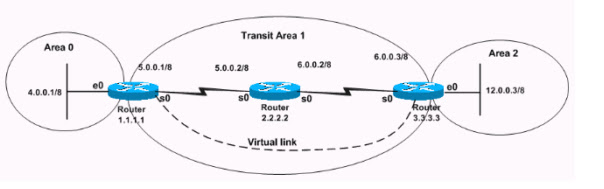
R3 E’ IL ROUTER NON CONNESSO ALL’AREA 0 ESSO DIVENTA UN VIRTUAL ABR ED
HA BISOGNO PER L’AUTENTICAZIONE DI AVERE L’AREA 0 AUTHENTICATION ALL’INTERNO DI ROUTER CONFIGURATION. (usare SHOW IP OSPF VIRTUAL LINK per osservare lo stato UP ed il tipo di autenticazione usata)
R1
interface Ethernet0
ip ospf authentication-key cisco ß COMANDO 1
router ospf 2
area 0 authentication ß COMANDO 2
area 1 virtual-link 3.3.3.3 authentication-key cisco ß COMANDO 3
R3
interface Ethernet0
ip ospf authentication-key cisco ß COMANDO 1
router ospf 2
area 0 authentication message-digest ß COMANDO 2
area 1 virtual-link 1.1.1.1 message-digest-key 1 md5 cisco ß COMANDO 3
This document shows sample configurations for Open Shortest Path First (OSPF) authentication which allows the flexibility to authenticate OSPF neighbors. You can enable authentication in OSPF in order to exchange routing update information in a secure manner. OSPF authentication can either be none (or null), simple, or MD5.
1. The authentication method "none" means that no authentication is used for OSPF and it is the default method.
2. With simple authentication, the password goes in clear-text over the network.
3. With MD5 authentication, the password does not pass over the network.
MD5 is a message-digest algorithm specified in RFC 1321. MD5 is considered the most secure OSPF authentication mode. When you configure authentication,
Ø you must configure an entire area with the same type of authentication.
Ø Starting with Cisco IOS® Software Release 12.0(8), authentication is supported on a per-interface basis
These are the three different types of authentication supported by OSPF.
· Null Authentication—This is also called Type 0 and it means no authentication information is included in the packet header. It is the default.
· Plain Text Authentication—This is also called Type 1 and it uses simple clear-text passwords.
· MD5 Authentication—This is also called Type 2 and it uses MD5 cryptographic passwords
Plain text authentication is used when devices within an area cannot support the more secure MD5 authentication. Plain text authentication leaves the internetwork vulnerable to a "sniffer attack," in which packets are captured by a protocol analyzer and the passwords can be read. However, it is useful when you perform OSPF reconfiguration, rather than for security. For example, separate passwords can be used on older and newer OSPF routers that share a common broadcast network to prevent them from talking to each
Iscriviti a:
Post (Atom)